
لسنوات، كان HDMI أحد الكبلات التي لا غنى عنها لتوصيلات المسرح المنزلي لدينا، حيث ينقل الصورة والصوت النقي من المشغلات إلى أجهزة التلفزيون. يبدو كبل HDMI بسيطاً بما فيه الكفاية، ولكنه في الواقع طريق رقمي سريع يحمل تدفقات بيانات الصوت والفيديو.
مع تطور التكنولوجيا، أصبحت تنسيقات الصوت أكثر تقدماً. لذلك، برزت مشكلة لوجستية: كيفية الحصول على صوت عالي الجودة من التلفزيون إلى مكبر الصوت العمودي/مكبر الصوت المكتبي أو جهاز استقبال الصوت والصورة بدون تشابك الكابلات الإضافية.

أحدثت الإجابة ثورة في الصوت المنزلي: قناة إرجاع الصوت (ARC)، وخليفتها القوية، قناة إرجاع الصوت المحسّنة (eARC). ستبذل هذه المدونة كل ما في وسعها لشرح هذه التقنيات بطريقة بسيطة ومفصلة في الوقت نفسه، مما يساعدك على بناء إعداد صوتي أنظف وأذكى وغامر حقًا.
ما هو HDMI؟
HDMI هو اختصار لعبارة ‘واجهة الوسائط المتعددة عالية الوضوح’. ظهر HDMI لأول مرة منذ 20 عامًا، وتطورت HDMI من HDMI 1.0 إلى أحدثها HDMI 2.2 - وقد زاد عرض النطاق الترددي باستمرار (حتى 96 جيجابت في الثانية) لدعم دقة مثل 4K و16K بمعدلات إطارات عالية، مما أدى إلى تغيير سريع في كيفية توصيلنا لأجهزة الكمبيوتر الشخصي وأجهزة التلفاز وأجهزة العرض ومكبرات الصوت ومضخمات الصوت ومضخمات الصوت والفيديو.
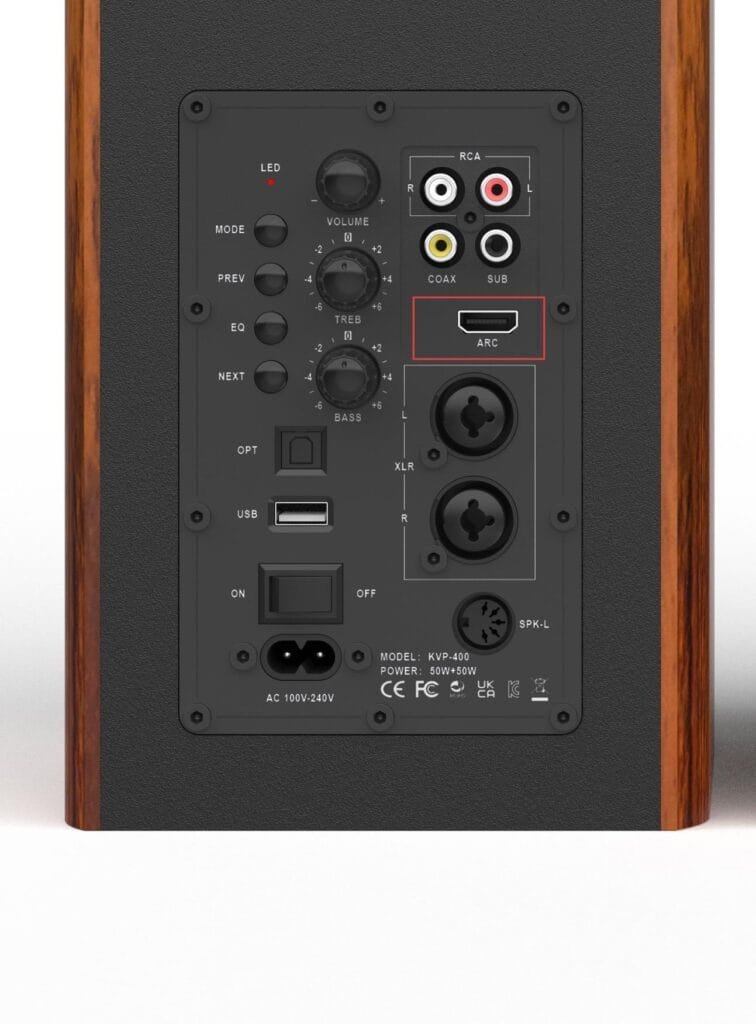
ما هو HDMI ARC؟
قوس قزح ترمز إلى قناة إرجاع الصوت. إنها ميزة في معيار HDMI (تم تقديمها في الإصدار 1.4) مصممة لتبسيط الاتصال بين التلفزيون ونظام صوتي خارجي، مثل مكبرات الصوت أو جهاز استقبال المسرح المنزلي.

إليك كيفية عملها وسبب أهميتها:
- ما الذي تفعله في الواقع؟
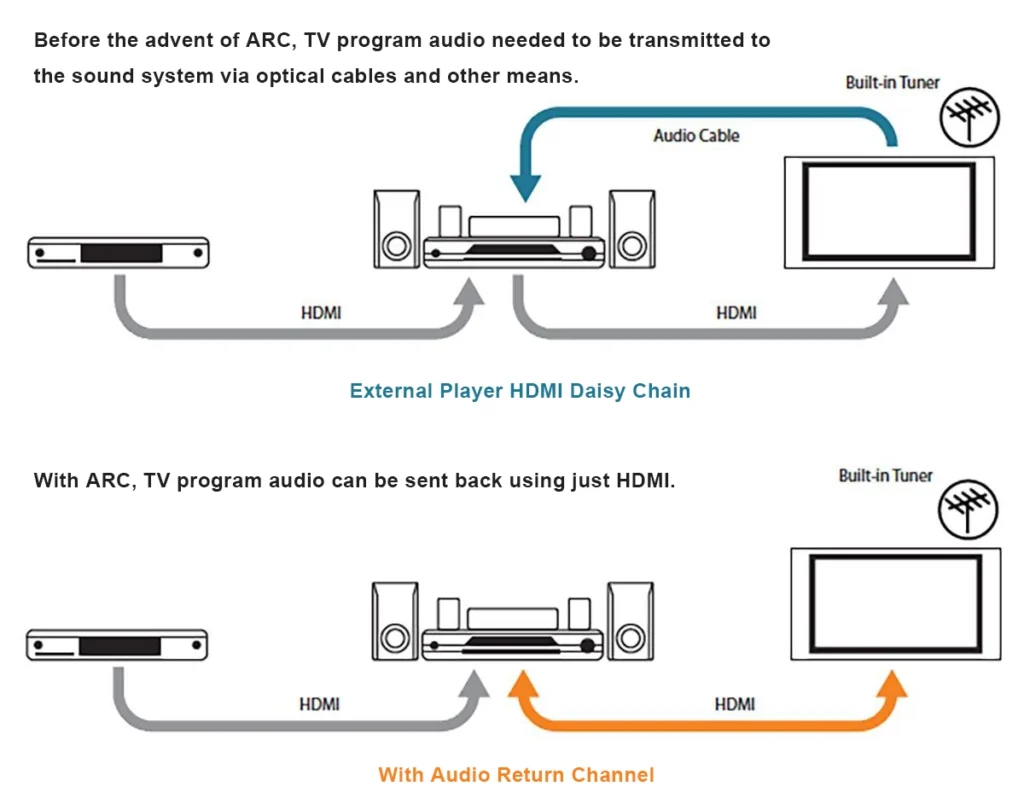
عادةً ما يرسل كبل HDMI الفيديو والصوت من مصدر (مثل مشغل Blu-ray أو وحدة التحكم في الألعاب) إلى التلفزيون. أما ARC فيسمح للتلفزيون بإرسال الصوت “من المنبع” أو “للخلف” من خلال كابل HDMI نفسه إلى مكبرات الصوت.
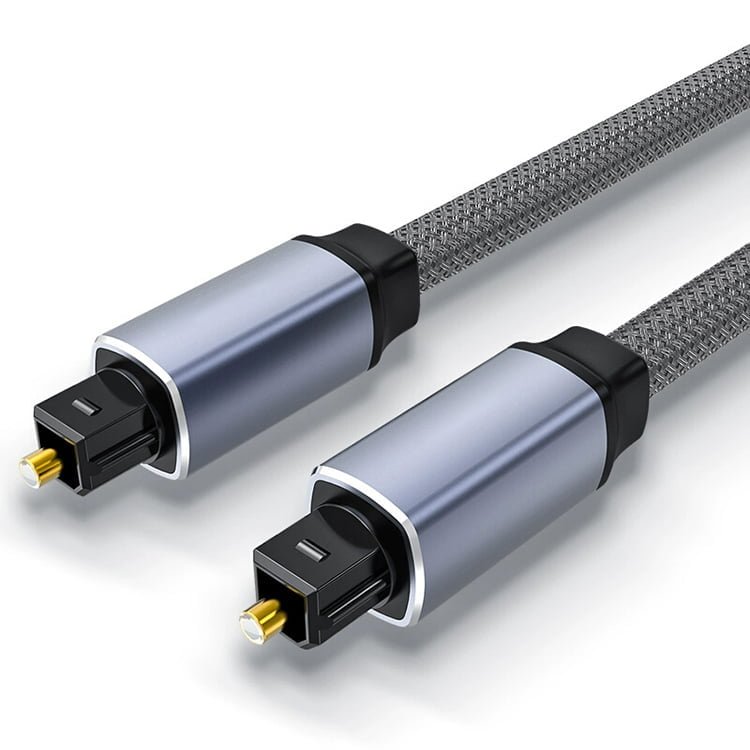
- بدون ARC: ستحتاج إلى كابل HDMI واحد للفيديو وكابل بصري (Toslink) أو كابل RCA منفصل لتوصيل صوت التلفزيون إلى مكبر الصوت العمودي.
- مع ARC: كابل واحد واحد يتعامل مع كل شيء.
- المزايا الرئيسية
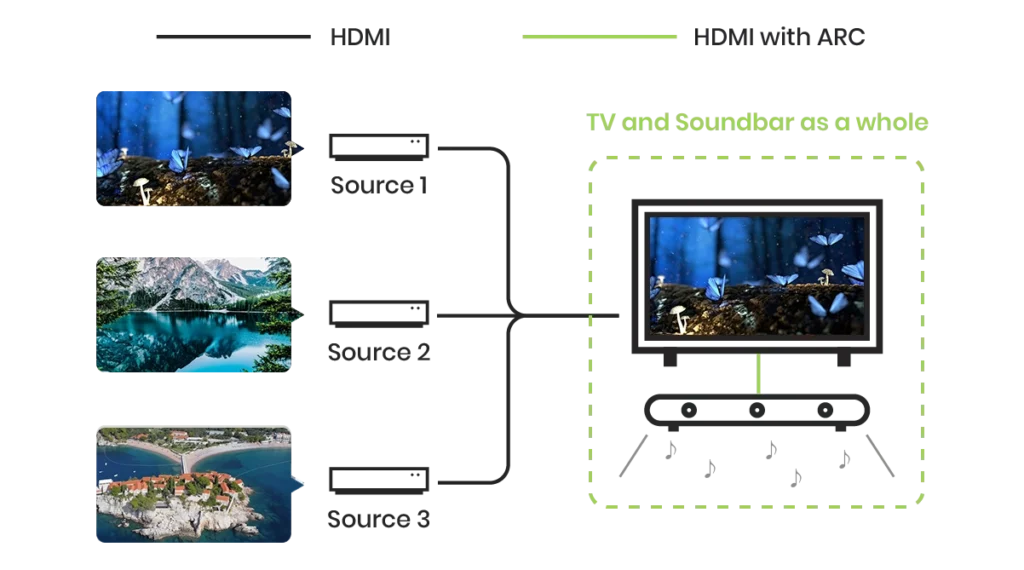
- تقليل فوضى الكابلات: أنت بحاجة إلى كبل HDMI واحد فقط لتوصيل التلفزيون بمكبر الصوت.
- صوت مدمج: يتم توجيه أي شيء يتم تشغيله على تلفزيونك - سواء كان تطبيقاً مدمجاً مثل Netflix أو هوائياً متصلاً أو وحدة تحكم بالألعاب - تلقائياً إلى مكبرات الصوت الخارجية.
- جهاز تحكم عن بُعد واحد: نظرًا لأن ARC يعمل عادةً إلى جانب HDMI-CEC (التحكم الإلكتروني الاستهلاكي)، يمكن لجهاز التحكم عن بُعد الخاص بالتلفزيون التحكم تلقائيًا في مستوى الصوت وقوة مكبر الصوت العمودي.
- كيفية الاستخدام
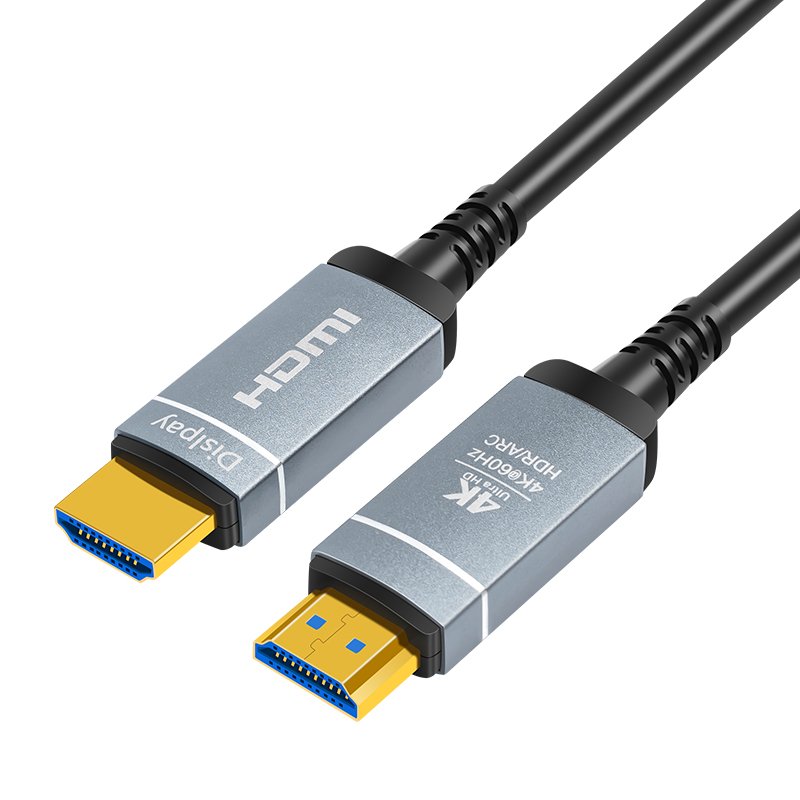
لاستخدام ARC، يجب أن يحتوي كل من التلفزيون وجهاز الصوت الخاص بك على منافذ تحمل علامة “HDMI ARC” تحديداً. - قم بتوصيل أحد طرفي كبل HDMI عالي السرعة بمنفذ HDMI ARC في التلفزيون.
- قم بتوصيل الطرف الآخر بمنفذ HDMI ARC (الإخراج) الخاص بمكبر الصوت.
- تأكّد من تمكين HDMI-CEC في إعدادات التلفزيون (تستخدم العلامات التجارية أسماء مختلفة لهذا الغرض، مثل Anynet+ لسامسونج أو Bravia Sync لسوني).
ما هو HDMI eARC ؟
eARC ترمز إلى قناة إرجاع الصوت المحسّنة. إنه تطور الجيل التالي من ARC، الذي تم تقديمه رسميًا مع مواصفات HDMI 2.1 في نوفمبر 2017 كجزء من إعلان مواصفات HDMI 2.1.

في حين أن ARC القياسي سهّل توصيل مكبرات الصوت، تم تصميم eARC للتعامل مع متطلبات البيانات الضخمة للصوت السينمائي الحديث “القائم على الكائنات” مثل Dolby Atmos.
الاختلافات الرئيسية بين HDMI ARC مقابل eARC
الفرق الأساسي هو عرض النطاق الترددي وبعض الميزات المذكورة أدناه:
| الميزة | TOSLINK (بصري) | HDMI ARC | HDMI eARC |
| مستوى الأداء | جيد | أفضل | الأفضل |
| الكابل مطلوب | بصري S/PDIF | منفذ HDMI | HDMI مع إيثرنت (AOC) |
| الحد الأقصى للنطاق الترددي | ~حوالي 384 كيلوبت في الثانية | ~حوالي 1 ميغابت في الثانية | 37 ميغابت في الثانية |
| غير مضغوطة 5.1/7.1 | لا يوجد | لا يوجد | نعم |
| دولبي أتموس/ DTS:X | لا يوجد | لا يوجد | نعم (معدل البت العالي) |
| طريقة الاكتشاف | لا يوجد | لجنة الانتخابات المركزية | قناة بيانات eARC الإلكترونية |
| تصحيح مزامنة الشفاه | لا يوجد | اختياري | إلزامي |
| جهاز تحكم عن بُعد واحد | لا يوجد | نعم (CEC) | نعم (CEC) |
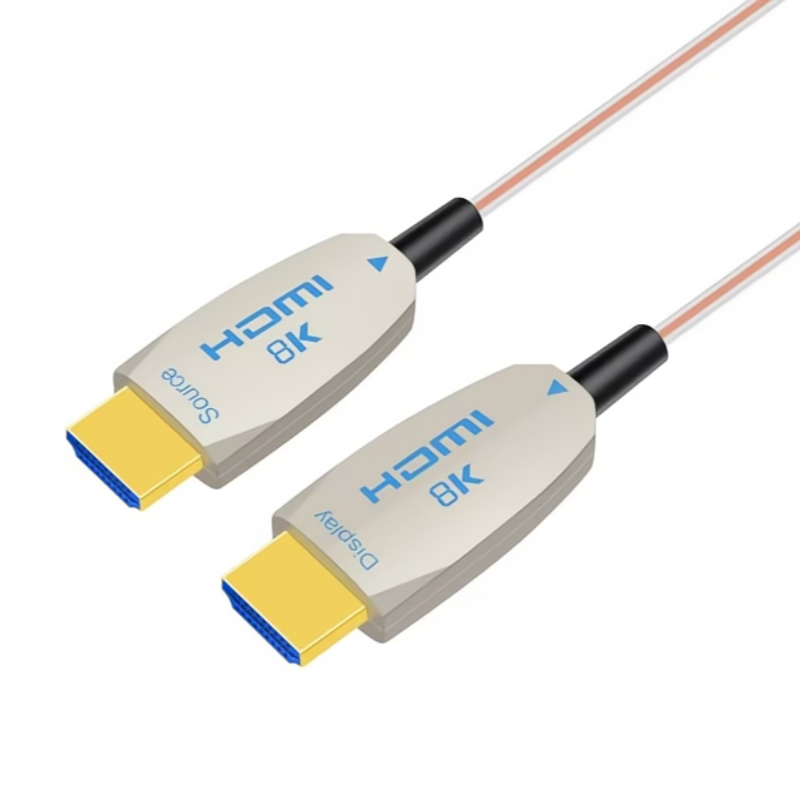
على الرغم من استمرار استخدام كبل TOSLINK البصري للأجهزة القديمة القديمة، إلا أنه لا يمكنه دعم الصوت الغامر الحديث. بالنسبة إلى أجهزة التلفاز بدقة 8K ومكبرات الصوت/مكبرات الصوت المتطورة ومكبرات الصوت عالية السرعة، يُعدّ كبل HDMI 2.1 البصري النشط فائق السرعة (AOC) الحل المثالي. على عكس HDMI النحاسي، تحافظ تقنية AOC التي نقدّمها على قناة بيانات eARC بسرعة 37 ميغابت في الثانية على مسافات تصل إلى 30 متراً، مما يضمن عدم تدهور الإشارة للصوت غير المضغوط 7.1 غير المضغوط.
كابلات لإعداد المسرح المنزلي
الأسئلة الشائعة الأكثر شيوعًا حول HDMI ARC و eARC
سؤال: هل تدعم كل كابلات HDMI تقنية ARC؟
جواب: الإجابة المختصرة هي لا، ليس كل كبل HDMI يدعم ARC، ولكن معظم الكبلات الحديثة تدعم ARC. تم تقديم ARC (قناة إرجاع الصوت) مع مواصفات HDMI 1.4 في عام 2009.
الكابلات القديمة (قبل 2009): إذا كنت تستخدم كبل “HDMI قياسي” قديم جدًا (الإصدار 1.0 إلى 1.3)، فعلى الأرجح أنه لا يدعم ARC.
الكابلات الحديثة (ما بعد 2009): سيدعم أي كبل مكتوب عليه “HDMI عالي السرعة HDMI” (الإصدار 1.4 أو 2.0) أو “HDMI فائق السرعة HDMI” (الإصدار 2.1) تقريبًا تقنية ARC.
سؤال: الحد الأقصى لطول HDMI ARC/eARC؟
جواب: لا توجد إجابة قياسية على هذا السؤال لأن الحد الأقصى للطول يتراوح من 1 م إلى 30 م، وذلك حسب جودة الكابلات والأجهزة المختلفة. كلما زاد طول الكابل، تضعف الإشارة الكهربائية (التوهين)، مما يؤدي إلى انقطاع الصوت أو مشاكل في مزامنة الشفاه أو فقدان مصافحة ARC/eARC بالكامل. إليك جدول مقارنة للرجوع إليه:
| نوع الاتصال | كابل نحاسي سلبي | كابل HDMI2.1 الضوئي النشط بدقة 8K (AOC) |
| معيار ARC | 5 م - 7.5 م | 30m |
| HDMI eARC | 1م - 3م | 20m |
| فيديو بدقة 8K (48 جيجابت في الثانية) | 2م - 3م | 20m |
| موثوقية الإشارة | ارتفاع مخاطر التسرب من المدارس | مستقر للغاية (بدون فقدان) |
سؤال: هل يمكنني استخدام كابل HDMI عادي لـ eARC؟
جواب: بالنسبة إلى المسافات القصيرة (أقل من 3 أمتار)، قد يعمل “كبل HDMI عالي السرعة مع إيثرنت”. ومع ذلك، للحصول على دقة 8K وأداء مستقر لـ eARC، نوصي بشدة باستخدام كبل HDMI 2.1 فائق السرعة فائق السرعة.
نصيحة للمحترفين: إذا كان إعدادك يتطلب مسافة تزيد عن 5 أمتار، فغالبًا ما تفشل الكابلات النحاسية في الحفاظ على المصافحة المطلوبة لـ eARC. وهنا يصبح كابل HDMI AOC (الكبل البصري النشط) ضرورياً.
سؤال: هل يدعم HDMI ARC/eARC فيديو 8K؟
جواب: من الناحية الفنية، يتعامل ARC و eARC مع الصوت فقط. ومع ذلك، نظرًا لأن eARC الإلكترونية جزء من مواصفات HDMI 2.1، فإنها تقترن دائمًا تقريبًا بإمكانيات 8K. يضمن لك استخدام مشغل HDMI 2.1 AOC من الألياف البصرية بدقة 8K الحصول على النطاق الترددي 48 جيجابت في الثانية اللازم لكل من فيديو 8K@60 هرتز وصوت eARC عالي معدل البت.
سؤال: لماذا لا يعمل جهاز HDMI eARC الإلكتروني الخاص بي؟ (استكشاف الأخطاء وإصلاحها)
ج: تشمل الأسباب الأكثر شيوعًا ما يلي:
- CEC معطل: يجب تشغيل HDMI-CEC (التحكم الإلكتروني للمستهلك) في كلا الجهازين.
- المنفذ الخاطئ: تأكد من توصيل الكابل بالمنفذ المحدد المسمى “ARC/eARC” في كل من التلفزيون وجهاز الاستقبال.
- اتجاهية الكابل: تذكر أن كابلات AOC اتجاهية. إذا قمت بتوصيل طرف “العرض” في “المصدر”، فلن تعود إشارة eARC بشكل صحيح.
سؤال: أيهما أفضل للمسرح المنزلي، HDMI ARC أم HDMI eARC؟
جواب: بالنسبة إلى المسرح المنزلي الحديث، يُعدّ HDMI eARC أفضل بكثير من HDMI ARC. على الرغم من أن ARC كان ابتكاراً رائعاً منذ عقد من الزمن، إلا أن eARC أصبح الآن معيار الصناعة للصوت المتطور.
س: هل يتوافق eARC متوافق مع ARC؟
نعم، إذا كان تلفزيونك يدعم eARC لكن مكبر الصوت العمودي يدعم ARC فقط، فسيظلان يعملان معًا. ومع ذلك، سيقتصر الصوت على جودة ARC القياسية المضغوطة. للحصول على الاستفادة الكاملة من الصوت غير المنقوص، يجب أن يدعم كلا الطرفين تقنية eARC.
س: كيف يمكن إعداد اختبار 8K HDMI 2.1 AOC eARC بدقة 8K؟
لمساعدتك على تصور الاتصال المثالي، قمنا بتسجيل عرض توضيحي تقني.
س: لماذا تختار شركة AOCfiberlink لحلول ARC/eARC؟
تكون الكابلات النحاسية القياسية عرضة للتداخل الكهرومغناطيسي (EMI) وفقدان الإشارة على نطاقات طويلة. تستخدم AOCfiberlink 8K Fiber Optic HDMI AOC من الألياف البصرية بدقة 8K تقنية الألياف النحاسية الهجينة المتطورة:
- ألياف بصرية ممتازة متعددة الأوضاع OM3: لفيديو عالي السرعة بسرعة 48 جيجابت في الثانية.
- أسلاك نحاسية خالية من الأكسجين: مخصص خصيصاً لمصافحة eARC/ARC وCEC المستقرة.
- بدون كمون: مثالي للألعاب الاحترافية والمسارح المنزلية المتطورة.
معلومات عنا
في أأوك فايبر لينك، نحن متخصصون في تصنيع منتجات عالية الجودة كابلات الألياف الضوئية USB & كابلات الألياف الضوئية HDMI التي تلبي متطلبات الأنظمة السمعية والبصرية الحديثة. صُممت كابلات الألياف الضوئية USB وHDMI التي نقدّمها لتقدم أداءً لا مثيل له، مما يضمن لك الاستمتاع بالإمكانات الحقيقية لأجهزتك عالية الوضوح.
إلى جانب كابلات الألياف البصرية HDMI القياسية وكابلات الألياف البصرية USB، نوفر أيضًا حلولاً مصممة خصيصًا لتلبية احتياجات العملاء الخاصة.
يُرجى عدم التردد في الاتصال بنا.
يمكنك أيضًا الاشتراك في قناة يوتيوب للبقاء على اطلاع.