- 1. Introduction
- 2. What is an active USB extension cable?
- 3. How Does an Active USB Extension Cable Work?
- 4. Active USB Extension Cables vs. Passive USB Extension Cables: What’s the Difference?
- 5. What is the maximum length of a USB extension cable?
- 6. When should you use an active fiber-optic USB extension cable?
- 7. Pure Fiber USB Extension Cables vs. Fiber/Copper Hybrid USB Extension Cables
-
8. How to Choose the Right Fiber-Optic USB Extension Cable
- 8.1 Selecting the Correct USB Connector Type
- 8.2 Selecting the Required USB Data Rate
- 8.3 Determining the Required Cable Length
- 8.4 Checking USB 2.0 Backward Compatibility
- 8.5 Consider Power Delivery Capability and Device Requirements
- 8.6 Evaluating the Installation Environment and Customization Requirements
- 9. Conclusion: Choosing the Right Active Fiber-Optic USB Extension Cable for Your Application
- FAQ
1. Introduction
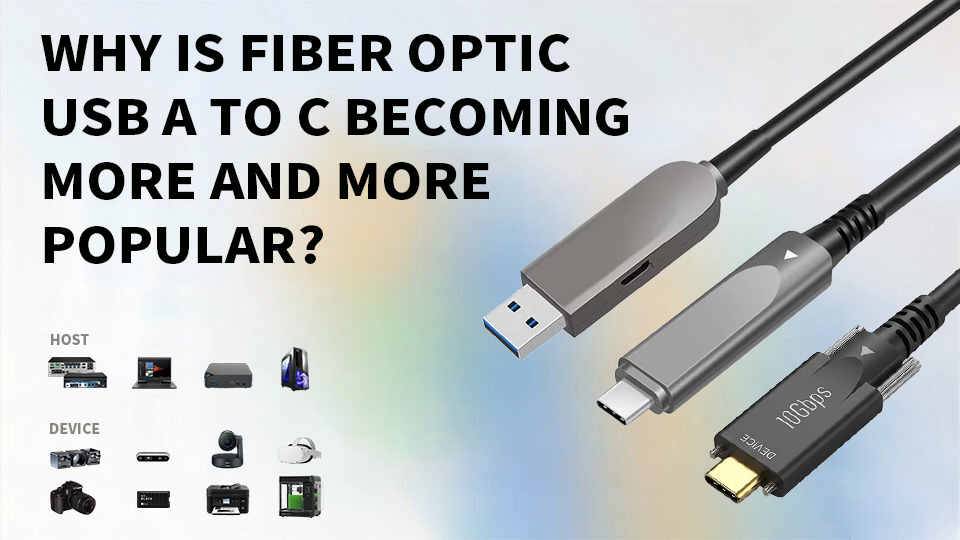
USB connections are widely used in professional camcorders, video conferencing systems, industrial automation, machine vision, and other applications that require high reliability in data transmission. However, when USB devices need to be installed far from the host computer, traditional copper extension cables may struggle to maintain a stable, high-speed connection over long distances.
Active optical USB extension cables utilize active electro-optical conversion technology and optical fiber to transmit high-speed USB data over greater distances, providing a practical solution for such requirements. Depending on the model and configuration, these cables can transmit data over distances of up to 100 meters while maintaining reliable signal performance. Their designs include both hybrid fiber-copper architectures and pure fiber architectures, with each approach differing in how data, control signals, and power are handled.
So, how do active optical USB extension cables work? What is their maximum transmission distance? And how should you choose the right product? This article will explain their technical principles, transmission distance limitations, key design differences, and practical applications to help you make an informed decision.
2. What is an active USB extension cable?
Active USB extension cables incorporate active electronic or optical signal processing components to extend USB connections beyond the practical range of traditional passive cables. Unlike passive USB extension cables, which rely entirely on copper conductors to transmit electrical signals, active cables use additional signal amplification circuits to maintain signal transmission over longer distances.
In professional applications requiring long-distance USB connections, Active Optical USB Extension Cables (AOC) provide a fiber-optic-based solution. Through active electro-optical conversion, they transmit high-speed USB data via optical fibers, making them suitable for scenarios where traditional copper cable connections may be affected by transmission distance, signal attenuation, or electromagnetic interference.
2.1 What Makes a USB Extension Cable Active?
The key difference between active and passive USB extension cables lies in whether they incorporate active signal processing components.
Passive USB extension cables transmit electrical signals directly through copper conductors. Their transmission performance is affected by factors such as cable length, conductor quality, signal attenuation, and USB data rates.
In contrast, active extension cables incorporate electronic circuits—depending on their specific design—to process, adjust, or regenerate signals, thereby helping to maintain a reliable connection over longer distances.
Active USB extension solutions can utilize different transmission technologies. Some products rely on electronic signal processing technology within copper cables, while active optical USB extension cables use optical transmitters and receivers to convert USB electrical signals into optical signals and back again at the receiving end. This article focuses primarily on the latter.
2.2 What Is an Active Optical USB Extension Cable?
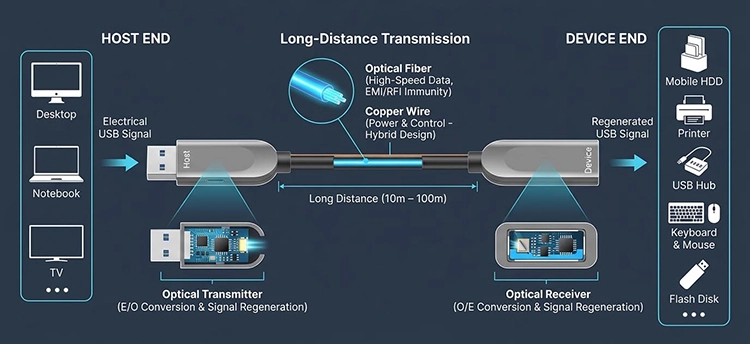
Active Optical USB Extension Cable use optical fibers and active conversion components to extend USB connections over greater distances.
A typical USB AOC consists of the following key components:
• Host End/Transmitter: Connects to a computer or USB host and receives USB electrical signals.
• Optical Transmitter: Converts high-speed electrical data signals into optical signals.
• Optische Faser: Transmits the optical signal data throughout the entire cable.
• Optical Receiver: Reconverts the optical signals back into electrical signals.
• Device End: Connects to a USB peripheral, enabling the peripheral to communicate with the host.
Depending on their internal architecture, USB AOC can feature a hybrid fiber-copper design or a pure fiber-optic design.
In hybrid fiber/copper USB AOC, the optical fiber transmits high-speed data, while the copper conductors transmit power, handshaking signals, and other control signals.
In a pure fiber USB AOC, both data and handshaking or communication signals are transmitted via optical fiber. Since these signals are not carried by copper conductors, power delivery requires a separate solution or is handled according to the specific product design.
2.3 What Are the Main Advantages of Optical USB Extension Cables?
Fiber-optic USB active extension cables offer several advantages for professional and long-distance connections:
• Long-distance connectivity: Supports USB connections spanning tens of meters; some models can be customized for distances up to 100 meters.
• High-speed data transmission: Depending on the cable model, supports high-speed USB protocols including 5 Gbps and 10 Gbps.
• Excellent EMI/RFI immunity: The optical data transmission path offers strong resistance to electromagnetic and radio frequency interference.
• Reliable signal performance: Optical transmission helps reduce signal degradation caused by long-distance copper cable data transmission paths.
• Flexible design options: Hybrid fiber/copper and pure fiber architectures can meet various requirements for power supply, control signals, and electrical isolation.
The appropriate USB AOC should be selected based on the required transmission distance, data rate, connector type, device power requirements, and installation environment.
3. How Does an Active USB Extension Cable Work?
An active fiber-optic USB extension cable works by first converting high-speed USB electrical signals into optical signals, transmitting them via fiber-optic cable, and finally reconverting them back into electrical signals at the receiving end. Through this process, USB data can be transmitted over distances far exceeding those of traditional copper extension cables, while maintaining reliable signal transmission.
3.1 Conversion from Electrical to Optical Signals
At the host end of the cable, the cable receives USB electrical signals from the connected computer or host device. An integrated active optical transmitter processes these signals and uses electro-optical conversion technology to convert the high-speed data into optical signals.
This conversion process is critical because optical fiber transmits information as light rather than electrical signals. It enables high-speed USB data to be transmitted over long distances without relying on long-distance copper cable data transmission paths.
3.2 High-Speed Data Transmission via Optical Fiber
Once the data is converted into optical signals, it is transmitted through the optical fiber inside the cable. Unlike copper conductors, optical fiber is highly resistant to electromagnetic interference (EMI) and radio frequency interference (RFI), making it suitable for installation near electrical equipment, industrial machinery, and other potential sources of interference.
Depending on the cable model and USB specifications, active fiber-optic USB extension cables can support data rates of up to 5 Gbps or 10 Gbps, with some configurations offering transmission distances of up to 100 meters.
3.3 Conversion of Optical Signals to Electrical Signals at the Receiving End
At the device end, an integrated optical receiver reconverts the incoming optical signals back into USB electrical signals. These signals are then transmitted to the connected peripheral, enabling it to communicate with the host device via the extended USB connection.
The transmitter and receiver work together to maintain the USB data link over the fiber-optic connection.
3.4 How Are Power and Control Signals Transmitted?
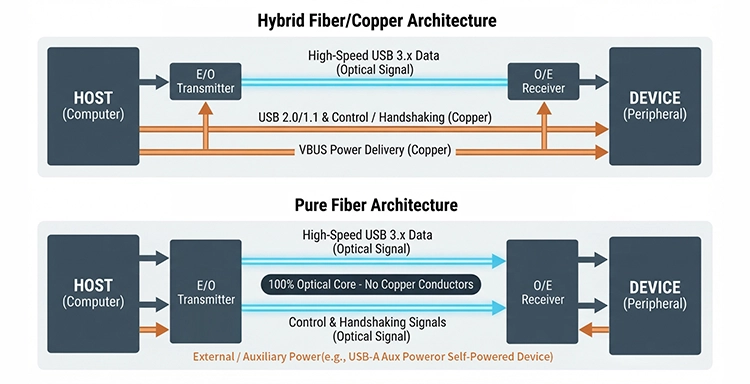
The method of transmitting power and control signals depends on the cable’s internal architecture. Common designs include hybrid fiber/copper and pure fiber architectures.
In a hybrid fiber/copper design, the optical fiber is responsible for transmitting high-speed data, while the copper conductors are responsible for transmitting power, USB 2.0/1.1 signals, and handshaking or control signals. For example, the FUMF-3001 USB extension cable uses this architecture.
In a pure fiber design, both data and communication or handshaking signals are transmitted via optical fiber; copper conductors are not used to transmit these signals. Depending on the model, power delivery must be implemented through a separate solution. For example, the FPUC-3001 uses a USB-A auxiliary power cable at the device end, while the FPUC-3003 is suitable for scenarios where the connected device can supply its own operating power.
Therefore, when selecting an Active Optical USB Extension Cable, it is important not only to verify its data rate and maximum length but also to understand how the cable handles power delivery and control signals.
4. Active USB Extension Cables vs. Passive USB Extension Cables: What’s the Difference?
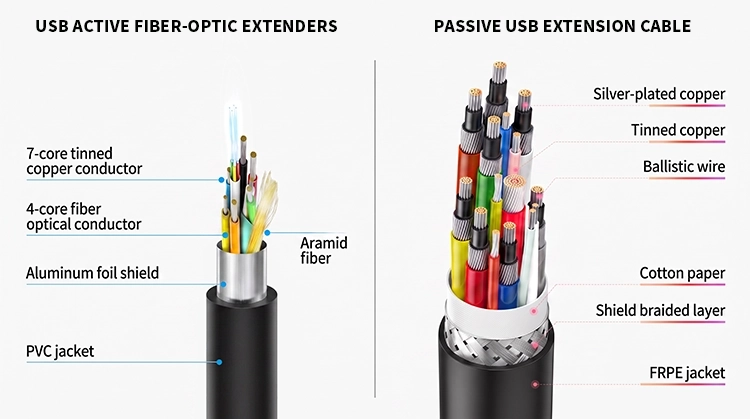
The main difference between active USB extension cables and passive USB extension cables lies in how USB signals are transmitted. Passive cables rely on copper conductors to transmit electrical signals directly, while active USB extension cables use electronic components to convert high-speed USB data into optical signals, which are then transmitted via optical fiber.
There is no absolute superiority or inferiority between the two types. The right choice depends on the required cable length, data rate, device compatibility, and power supply requirements.
4.1 How Passive USB Extension Cables Work
Passive USB extension cables use copper wires to transmit electrical signals between the host and the connected device; they do not contain active optical conversion components or signal processing circuits.
Passive cables are typically suitable for short-distance connections, such as connecting keyboards, mice, printers, and other everyday USB peripherals. However, as cable length and data rates increase, signal attenuation and signal integrity issues become more pronounced, thereby limiting their reliability in long-distance, high-speed applications.
4.2 How Active Fiber-Optic USB Extension Cables Work
Active fiber-optic USB extension cables contain active optical components that convert USB electrical data into optical signals at the transmitter end. The signals are transmitted via optical fiber and reconverted into electrical signals at the receiver end.
Compared to traditional passive copper cables, this architecture supports USB connections over longer distances. Additionally, the fiber-optic data transmission path offers strong resistance to electromagnetic interference (EMI) and radio frequency interference (RFI).
Depending on the cable design, power and control signals may be transmitted via copper conductors or through a separate power supply solution.
4.3 Active Optical USB vs. Passive USB: Key Differences
| Merkmal | Passive USB Cable | Aktives optisches USB-Kabel |
|---|---|---|
| Transmission medium | Kupfer | Optical fiber for high-speed data |
| Signal conversion | No active optical conversion | Electrical-to-optical and optical-to-electrical conversion |
| Transmission distance | Generally shorter | Can reach up to 100m in selected models |
| EMI/RFI resistance | Depends on cable shielding and design | Optical data path is highly resistant |
| Power delivery | Through copper conductors | Depends on cable architecture |
| Typical applications | Everyday, short-distance connections | Long-distance professional AV and industrial connections |
4.4 When Should You Choose an Active Fiber-Optic USB Cable Instead of a Passive USB Cable?
For everyday short-distance USB connections, passive extension cables are usually sufficient and more cost-effective.
Active fiber-optic USB extension cables are a more suitable choice in the following situations:
1. Extending USB connections to 10 meters, 20 meters, 50 meters, or even 100 meters, depending on the model.
2. To maintain high-speed data transmission over longer distances; some models support speeds of up to 10 Gbps.
3. To connect cameras, professional audiovisual equipment, or industrial devices located far from the host computer.
4. To reduce the impact of electromagnetic interference on high-speed data transmission paths.
5. Meet specific remote power supply or electrical isolation requirements through appropriate cable architecture.
The key is to ensure that the cable’s data rate, maximum supported distance, USB compatibility, and power supply design align with the actual application. Passive cables remain a practical choice for short-distance connections, while fiber-optic AOC are specifically designed for applications where traditional copper extension cables cannot meet distance or signal requirements.
5. What is the maximum length of a USB extension cable?
The maximum length of a USB extension cable depends on several factors, including the USB protocol, data rate, cable design, signal processing methods, and backward compatibility requirements. Passive copper USB extension cables are typically used for shorter-distance connections, while active optical USB extension cables can extend USB connections over much greater distances. Depending on the model and operating configuration, some optical USB AOC solutions can achieve transmission distances of up to 100 meters.
5.1 What is the maximum length of a passive USB extension cable?
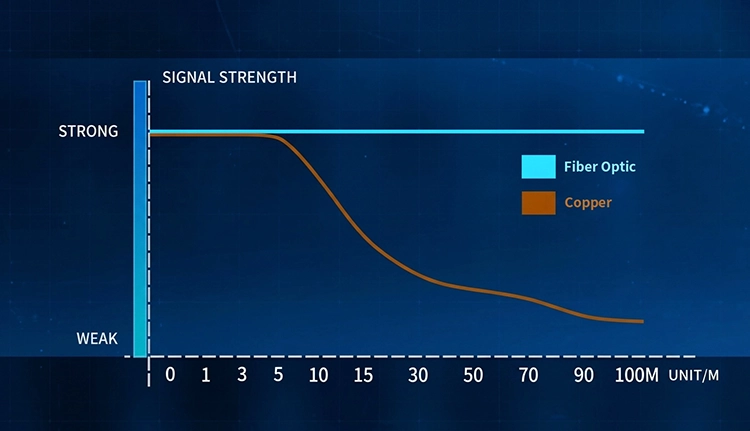
Passive USB extension cables transmit electrical signals directly through copper conductors. As cable length increases, signal attenuation, timing issues, and signal integrity problems become more pronounced, especially at higher data rates.
Actual distance limitations vary depending on the USB version, transmission speed, conductor quality, shielding design, and the connected devices. A cable that reliably supports a USB 2.0 connection over a short distance may not maintain the same performance for a USB 3.x connection over a longer distance.
Therefore, there is no single maximum length that applies to all passive USB extension cables. When the connection distance needs to significantly exceed the range of standard cables while maintaining reliable high-speed data transmission, it is worth considering the use of an active fiber-optic USB extension cable.
5.2 How Far Can Active Optical USB Extension Cables Reach?
Fiber optic USB AOC products are designed for extended-distance USB connectivity. Different models support different data rates, connector types, and maximum lengths.
The following table shows the maximum configurable lengths of selected AOCFiberlink USB extension cables:
| Product Model | Schnittstelle | Maximum Data Rate | Maximum Configurable Length |
|---|---|---|---|
| FUCC-3203 | USB-C auf USB-C | 10 Gbit/s | 20m |
| FPUC-3003 | USB-A to USB-A | 5 Gbit/s | 100m |
| FPUC-3001 | USB-A Male to Female | 5 Gbit/s | 100m |
| FUMF-3001 | USB-A Male to Female | 5 Gbit/s | 100m |
| FUMF-3201 | USB-A Male to Female | 10 Gbit/s | 100m |
These figures represent the maximum customizable lengths and are not necessarily the standard lengths available for each model. For example, the FUCC-3203 comes standard at 10 meters but can be customized up to 20 meters; the FPUC-3003 is listed on the product page as a 50-meter product but can be customized up to 100 meters.
With a wide range of length options, these fiber-optic USB extension cables are suitable for applications requiring connection distances of 20 meters, 50 meters, or even 100 meters, including professional audiovisual installations, industrial equipment, and machine vision systems.
5.3 Does USB 2.0 compatibility affect the maximum extension distance?
Yes. USB 2.0 backward compatibility can significantly affect the maximum length supported by a cable. Actual results depend not only on the data rate but also on the signal processing design within the cable.
AOCFiberlink’s two USB-A models illustrate this difference:
| Merkmal | FUMF-3001 | FUMF-3201 |
|---|---|---|
| Maximum USB specification | USB 3.0 | USB 3.2 Gen 2 |
| Maximum data rate | 5 Gbit/s | 10 Gbit/s |
| Maximum length without USB 2.0 compatibility | 100m | 100m |
| Maximum length with USB 2.0 compatibility | Approx. 5–6m | Up to 60m |
| Additional amplifier | Nein | Ja |
The FUMF-3001 supports USB 3.0 with speeds up to 5 Gbps and can transmit signals up to 100 meters without requiring USB 2.0 compatibility. When USB 2.0 compatibility is required, the maximum transmission distance is approximately 5–6 meters, as the signal path is not configured with additional amplifiers.
In contrast, the FUMF-3201 supports USB 3.2 Gen 2 with a maximum data rate of 10 Gbps and also achieves a transmission distance of up to 100 meters in USB 3.x configurations. Its amplifier design enables a transmission distance of up to 60 meters in USB 2.0-compatible mode.
The actual data rate also depends on the connected devices. The FUMF-3201 can achieve a maximum data rate of 10 Gbps only when both the host and peripheral support USB 3.2 Gen 2. If the connected devices support only USB 3.0, the actual operating speed will be limited to 5 Gbps.
Therefore, when selecting a long-distance USB extension cable, you must confirm both the required transmission distance and whether USB 2.0 compatibility is needed. Do not assume that a model’s maximum transmission distance in USB 3.x mode applies equally to all supported protocols.
5.4 What is the maximum length of a USB extension cable?
For applications requiring ultra-long-distance USB connections, some active fiber-optic USB extension cables can transmit data over distances of bis zu 100 Meter. Depending on the model and operating configuration, options include both USB 3.0 solutions supporting 5 Gbps and USB 3.2 Gen 2 solutions supporting 10 Gbps.
However, the maximum transmission distance, data rate, and backward compatibility must be evaluated comprehensively. For example, the FUMF-3201 supports a maximum distance of 100 meters in USB 3.x transmission mode, but the maximum distance is 60 meters when backward compatibility with USB 2.0 is required. When selecting the correct model, ensure that these specifications match the actual host, peripheral, and installation requirements.
6. When should you use an active fiber-optic USB extension cable?
When standard USB cables cannot meet the required transmission distance, data performance, or reliability requirements, it is worth considering an active fiber-optic USB extension cable. It is particularly suitable for professional environments where USB devices need to be connected to a host computer from a distance.
The following are some common application scenarios.
6.1 Long-Distance USB Camera Connections

USB cameras are widely used in photography, video production, inspection, and remote monitoring. However, when a camera is installed far from a computer, traditional USB cables may not be able to provide sufficient connection distance while meeting data performance requirements.
Fiber-optic USB extension cables can connect cameras to desktop or laptop computers over longer distances, making them suitable for studio installations, remote camera deployments, and professional imaging systems.
For USB-C cameras, the FUCC-3203 USB-C to USB-C Active Optical Cable supports USB 3.2 Gen 2 data rates of up to 10 Gbps and USB Power Delivery of up to 60 W, with custom lengths available up to 20 meters. This is a viable option for compatible cameras and other USB-C devices that require both high-speed data transfer and power delivery.
When selecting a USB cable for Canon cameras, Nikon cameras, or other cameras, you should check the device’s connectors, USB protocol, and power requirements, rather than basing your choice solely on cable length.
6.2 Professional Audio-Visual and Video Conferencing

Modern conference rooms, lecture halls, and professional audio-visual systems typically use USB cameras, PTZ pan-tilt-zoom cameras, video conferencing equipment, and other peripherals, which are often located far from the host computer.
Active optical USB extension cable help maintain high-speed USB connections in these installation environments without relying on long-distance passive copper cable connections. USB-C AOC can be used with compatible USB-C devices, while USB-A models provide extended connectivity solutions for USB-A peripherals.
For installation projects requiring longer-distance USB-A connections, the FUMF-3201 supports speeds of up to 10 Gbps in USB 3.x mode and can be customized for lengths up to 100 meters.
6.3 Industrial Automation and Machine Vision
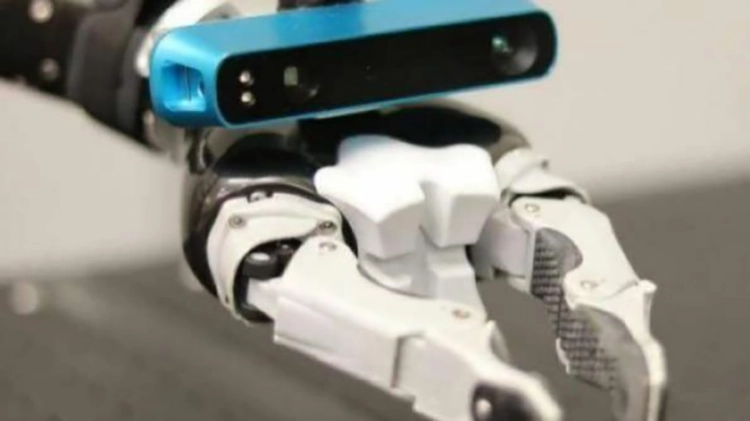
Industrial automation and machine vision systems typically deploy cameras and inspection equipment in locations far from the control computer. Electrical noise generated by motors, drives, and other mechanical equipment also poses challenges for traditional copper cable data connections.
Since high-speed data is transmitted via optical fiber, the data transmission path of fiber-optic USB AOC offers strong resistance to EMI/RFI interference. Therefore, they are suitable for industrial camera connections, automated inspection systems, and other applications requiring reliable long-distance USB connections.
For applications requiring both data and communication signals to be transmitted optically, pure fiber models such as the FPUC-3003 and FPUC-3001 are available options.
6.4 Medical and Electrically Sensitive Applications

Certain medical imaging systems and electrically sensitive systems require a USB connection between the device and the computer while minimizing conductive signal paths as much as possible.
Properly designed pure fiber USB AOC can transmit data and control signals optically, helping to reduce electrical coupling generated by the cable. This is particularly valuable for applications where electrical isolation is a critical system design consideration.
However, the use of fiber-optic cables does not automatically mean that the entire installation system is medically certified or complies with medical electrical safety standards. The complete system must still meet applicable safety and regulatory requirements.
7. Pure Fiber USB Extension Cables vs. Fiber/Copper Hybrid USB Extension Cables
Active fiber-optic USB extension cables typically employ one of two architectures: an pure fiber architecture or a fiber/copper hybrid architecture. Both use optical fiber for long-distance, high-speed USB data transmission, but they differ in how they handle handshake signals, control signals, and power delivery.
Neither design has an absolute advantage. The correct choice depends on the connected devices, power supply requirements, transmission distance, and installation environment.
7.1 Pure Fiber USB Extension Cables
Pure fiber USB extension cables use optical fiber not only to transmit high-speed data but also to transmit handshaking signals and communication control signals. Unlike hybrid architectures, they do not rely on copper conductors to transmit these signals.
This architecture provides optical transmission paths for both data and control communications, making it suitable for applications that require a reduction in electrical connections between devices.
However, power supply must be handled separately based on the cable design. For example:
• FPUC-3003: A USB-A male-to-male pure-fiber active optical cable supporting data rates up to 5 Gbps. The standard product configuration is 50 meters, but it can be customized up to 100 meters. The USB-A male connectors at both ends plug directly into the USB-A ports of the connected devices and draw operating power from their respective USB ports, eliminating the need for an additional power cable.
• FPUC-3001: A USB-A male-to-female pure fiber extension cable supporting data rates up to 5 Gbps, with a maximum length of 100 meters. The host end draws power directly from the connected USB-A port; the other USB-A male connector on the Y-shaped cable at the device end provides auxiliary power to the USB-A female end.
Pure fiber USB extension cables are particularly suitable for applications requiring long-distance, high-bandwidth data transmission while maintaining high signal integrity. By transmitting data and handshake/control signals optically, they help maintain reliable communication over long distances while reducing sensitivity to electromagnetic interference (EMI). Therefore, these cables are particularly suitable for devices involving high-volume data transmission, EMI-sensitive equipment, or environments with strong electromagnetic interference that require stable and accurate signal transmission.
7.2 Fiber-Optic/Copper Hybrid USB Extension Cables
Fiber-optic/copper hybrid USB extension cables combine optical fibers and copper conductors within a single cable.
In this architecture, the optical fibers are responsible for transmitting high-speed USB data, while the copper conductors handle power, handshaking signals, and other control communication signals. This allows data and power-related signals to be transmitted via different transmission media within the same cable.
Our product lineup includes the following models:
• FUCC-3203: A USB-C to USB-C fiber-optic/copper hybrid AOC that supports USB 3.2 Gen 2 data rates of up to 10 Gbps and Power Delivery of up to 60 W, with custom lengths available up to 20 meters.
• FUMF-3001: A USB-A male-to-female USB 3.0 fiber-copper hybrid AOC that supports data rates up to 5 Gbps and a maximum transmission distance of 100 meters in USB 3.x mode.
• FUMF-3201: A USB-A male-to-female fiber-optic/copper hybrid AOC supporting USB 3.2 Gen 2 data rates of up to 10 Gbps, with a maximum transmission distance of 100 meters in USB 3.x mode.
Fiber-optic/copper hybrid USB extension cables are ideal for applications requiring high-speed, long-distance data transmission along with reliable power delivery. This architecture uses optical fiber to transmit high-speed USB data with virtually no signal loss, while copper conductors carry power, handshake signals, and other control signals. As a result, a single cable can provide reliable, virtually lossless data transmission and stable power delivery over long distances.
7.3 Which Design Should You Choose?
The choice between a pure fiber-optic solution and a fiber-optic/copper hybrid solution depends primarily on the application’s requirements for signal transmission and power delivery.
| Application Requirement | Recommended Design |
|---|---|
| Optical transmission of data and handshake signals | Pure Fiber |
| Reduced electrical connection through data and control paths | Pure Fiber |
| Integrated USB data and power transmission | Hybrid Fiber/Copper |
| USB-C connectivity with Power Delivery | USB-C Hybrid AOC |
| Long-distance USB-A connectivity with bus power | USB-A Hybrid AOC |
| Separate auxiliary power at the device end | Pure Fiber AOC with auxiliary power |
Before selecting a cable, please verify the supported USB protocols, maximum transmission distance, backward compatibility, and power supply options.
Ultimately, there is no inherent superiority between pure fiber-optic and fiber-optic/copper hybrid architectures. The best solution is the one whose transmission architecture aligns with the connected devices and actual installation requirements.
8. How to Choose the Right Fiber-Optic USB Extension Cable
Choosing the right fiber-optic USB extension cable involves more than just selecting the cable length or data rate. Connector type, USB protocol, maximum transmission distance, backward compatibility, power supply requirements, and the installation environment all affect whether the cable will work properly with your devices.
For professional applications such as USB camera systems, video conferencing, industrial automation, and machine vision, it is especially important to ensure that the cable architecture matches the actual requirements of the connected devices.
The following factors can help you select the most suitable active fiber-optic USB extension cable for your specific application.
8.1 Selecting the Correct USB Connector Type
The first step is to identify the USB connector interfaces required by the host computer and the peripheral device. Different applications may require USB-A or USB-C connections, as well as various male-to-male or male-to-female configurations.
Common configurations include:
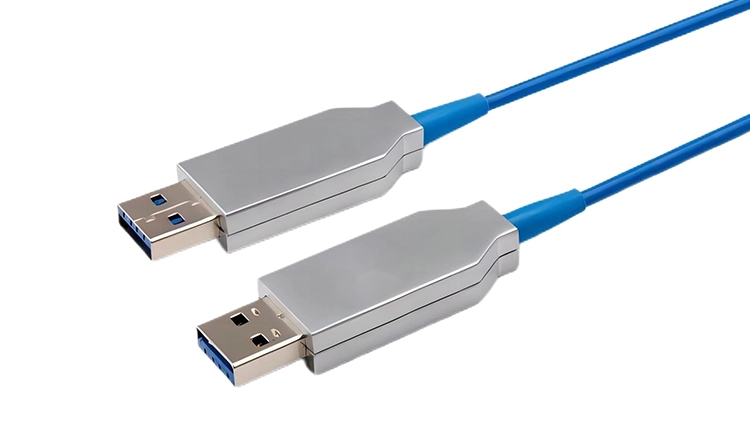
USB-A Male-to-Male
This configuration is used to connect two devices with USB-A female ports and is typically suitable for direct connections between USB-compatible devices and the host system.
For example, a USB-A male-to-male pure-fiber USB 3.0 active optical cable supports data transfer rates of up to 5 Gbps and can be customized to lengths of up to 100 meters.
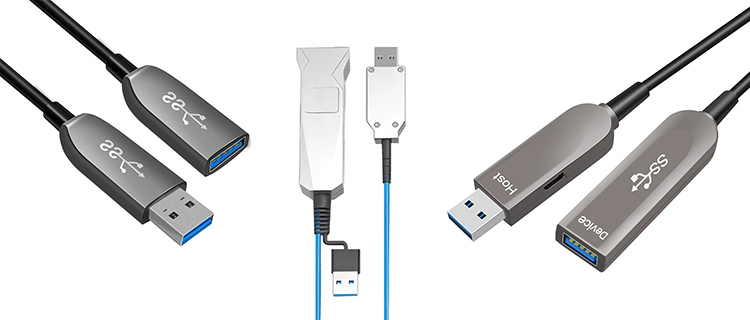
USB-A Male-to-Female
This is one of the most common USB extension configurations. The male connector connects to the host computer, while the female connector provides an extended USB port for the peripheral.
Depending on the required bandwidth, transmission distance, and signal architecture, available options include:
• USB 3.0 pure fiber male-to-female extension cable
• USB 3.0 fiber/copper hybrid active optical extension cable
• USB 3.2 Gen 2 10 Gbps Type-A male-to-female active optical cable
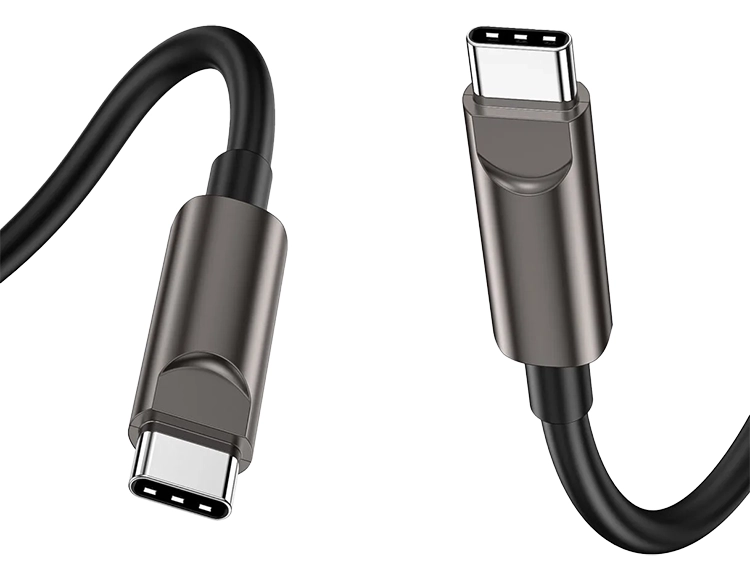
USB-C auf USB-C
USB-C ports are widely used in modern cameras, laptops, professional audiovisual equipment, and other high-speed peripherals.
USB-C active fiber optic extension cables are suitable for applications requiring high-speed data transmission, USB-C connectivity, and power delivery through a single cable.
For example, USB-C 10Gbps active fiber optic cables support USB 3.2 Gen 2 data transfer rates of up to 10Gbps, provide power delivery of up to 60W, and are available in custom lengths of up to 20 meters.
Before purchasing, be sure to verify the male and female connector types, interface types, and device-side requirements to avoid compatibility issues.
8.2 Selecting the Required USB Data Rate
The required data rate is another important factor to consider when selecting a USB fiber-optic extension cable. Different USB standards support different maximum bandwidths, and the cable must support the protocol required by the connected device.
Common USB data rates are as follows:
| USB Standard | Maximum Data Rate |
|---|---|
| USB 2.0 | 480Mbps |
| USB 3.0 / USB 3.2 Gen 1 | 5 Gbit/s |
| USB 3.1 Gen 2 / USB 3.2 Gen 2 | 10 Gbit/s |
For example, USB 3.2 Gen 2 active optical cables support data rates of up to 10 Gbps, but this does not mean that all connected devices can operate at that rate. The actual data rate depends on the individual performance capabilities of the host, peripheral, and cable.
If a 10 Gbps active optical fiber extension cable is connected to a device that only supports 5 Gbps USB 3.0, the actual operating speed of the connection will be limited to 5 Gbps, not 10 Gbps.
For different bandwidth requirements, consider the following options:
• 5Gbps USB 3.0 applications: FPUC-3003, FPUC-3001, and FUMF-3001.
• 10Gbps USB 3.2 Gen 2 applications: FUMF-3201 and FUCC-3203.
When selecting a cable, focus on the data rate actually supported by the product rather than relying solely on the USB version indicated in the product title. This is particularly important when comparing products marketed using different generations of USB naming conventions.
8.3 Determining the Required Cable Length
The installation distance between the host computer and the peripheral determines the minimum required cable length. However, distance alone should not be the sole consideration when selecting a fiber-optic USB extension cable.
You must also consider the cable’s maximum supported length in conjunction with data rates, USB compatibility, and cable architecture.
Typical application distances include:
• 10 meters: Suitable for camera installations, conference rooms, and professional desktop equipment deployments.
• 20 meters: Suitable for longer-distance USB-C connections and mid-range professional audiovisual system installations.
• 50 meters: Suitable for industrial equipment, remote USB peripherals, and larger installation environments.
• 100 meters: Suitable for machine vision, industrial automation, and long-distance USB connections in large commercial facilities.
Several USB active optical fiber extension cables in the AOCFiberlink product line support custom lengths of up to 100 meters.
For example, the FPUC-3003 is listed on the product page as a 50-meter model, but the actual maximum customizable length is 100 meters. Similarly, the FUCC-3203 comes standard at 10 meters but can be customized up to 20 meters.
When comparing different solutions, be sure to distinguish between a product’s standard length and its maximum customizable length.
Most importantly, be sure to verify that the cable supports the required USB protocols and backward compatibility at the length you plan to use.
8.4 Checking USB 2.0 Backward Compatibility
USB backward compatibility is an important consideration, especially when connecting older peripherals to newer host computers or when using devices that require USB 2.0 communication.
Not all active fiber-optic USB extension cables support USB 2.0 in the same way. Even if two products have the same maximum USB 3.x transmission distance, there may be significant differences in the distances they support in USB 2.0 compatibility mode.
This difference is influenced by the internal signal processing architecture and depends on whether additional amplification circuits are integrated into the cable design.
The following two models from the AOCFiberlink product line clearly illustrate this point:
FUMF-3001: USB 3.0 Active Fiber Optic Extension Cable
• Supports USB 3.0 data transfer at speeds up to 5 Gbps.
• Maximum transmission distance in USB 3.x mode: 100 meters.
• USB 2.0 backward compatibility: Supported.
• Maximum distance in USB 2.0-compatible mode: approximately 5–6 meters.
• Does not incorporate the additional amplifier design used in the FUMF-3201.
FUMF-3201: USB 3.2 Gen 2 Active Fiber Extension Cable
• Supports USB 3.2 Gen 2 data transfer rates up to 10 Gbps.
• Also supports USB 3.0 devices with speeds up to 5 Gbps.
• Maximum transmission distance in USB 3.x mode: 100 meters.
• USB 2.0 backward compatibility: Supported.
• Maximum distance in USB 2.0-compatible mode: up to 60 meters.
• Features an integrated amplifier circuit to extend the supported transmission distance in USB 2.0 mode.
This comparison illustrates that checking for USB 2.0 compatibility is crucial when selecting a long-distance active USB fiber-optic extension cable. A particular cable is rated to support
8.5 Consider Power Delivery Capability and Device Requirements
USB extension cables do more than just transmit data. Many connected peripherals also require power to operate, so power delivery capability is an important factor in the selection process.
Active optical USB cable with different architectures handle power and control signals in different ways.
Fiber-Optic/Copper Hybrid USB AOC
The fiber-optic/copper hybrid design uses optical fibers to transmit high-speed USB data, while copper conductors carry power, handshake signals, and other control communication signals.
This architecture integrates data transmission and power delivery into a single cable, making it suitable for peripherals that require both high-speed data connections and operating power.
For example, the FUCC-3203 USB-C active optical cable supports up to 60W Power Delivery, making it suitable for USB-C-compatible devices that require both data connectivity and power delivery.
Pure Fiber Optic USB AOC
In a pure fiber-optic design, data and handshaking/control signals are transmitted optically rather than via copper signal conductors. Since the cable does not rely on copper conductors to perform these functions, its power supply solution must be considered separately.
Depending on the product, power may come from the connected device’s independent power supply or from an auxiliary USB power connection.
For example, the FPUC-3001 uses an additional USB-A power cable on the device end to provide auxiliary power to the connected peripheral.
Before selecting a cable, consider the following questions:
• Does the connected device require power via the USB cable?
• Does the device require USB-C Power Delivery? What is the actual power requirement in watts?
• Does the peripheral come with its own power supply?
• Is an additional USB auxiliary power connection required?
• Can the host’s USB port provide sufficient operating power?
Selecting a cable with an appropriate power delivery architecture helps prevent connection instability and power-related compatibility issues.
8.6 Evaluating the Installation Environment and Customization Requirements
The installation environment also influences which type of fiber-optic USB extension cable is most suitable.
For example, industrial automation systems, machine vision equipment, and professional audiovisual installation projects may involve long cabling runs, electromagnetic interference, and harsh operating conditions.
In these environments, optical transmission offers a significant advantage: the fiber-optic data path is highly resistant to EMI/RFI interference. This helps maintain signal integrity in locations where traditional copper cable data transmission is more susceptible to electrical noise.
Other factors to consider include:
• EMI/RFI Environment: Optical transmission is particularly well-suited for environments with high levels of electrical noise.
• Electrical Isolation: Provided that the overall power supply and grounding schemes allow it, a purely optical fiber architecture can eliminate conductive data and control signal paths between the two ends of the connection.
• Cable Routing: Consider installation distance, available routing paths, bending requirements, and whether connectors are easily accessible.
• Operational Requirements: Verify that the cable is compatible with the connected cameras, computers, industrial equipment, and other USB peripherals.
• Customization Needs: For OEM and industrial projects, custom cable lengths, connector configurations, logos, and packaging may be required.
As a manufacturer of fiber-optic connectivity products, Shenzhen Fiberlink Tech Co., Ltd. offers pure fiber and fiber/copper hybrid active optical cable solutions to meet various USB connectivity needs.
For projects with specific transmission distances, bandwidth requirements, connector configurations, or power supply needs, working directly with the manufacturer helps determine the appropriate cable design and configuration.
9. Conclusion: Choosing the Right Active Fiber-Optic USB Extension Cable for Your Application
Selecting the right fiber-optic USB active extension cable depends on your requirements for transmission distance, data rate, connector type, power delivery capability, and device compatibility. Whether you need to integrate devices over long distances via USB 3.0 or provide 10 Gbps USB 3.2 Gen 2 connectivity for professional cameras and audiovisual systems, fiber-optic USB AOC offer a reliable solution for overcoming the practical transmission distance limitations of traditional copper cables.
Shenzhen Fiberlink Tech Co., Ltd. manufactures a wide range of pure fiber and fiber/copper hybrid USB active optical cables to meet diverse application needs. We also support OEM/ODM customization—including cable length, connector configurations, logos, and packaging—to help customers find the right fiber-optic USB extension solution for their projects.
FAQ
Q1: Do USB active extension cables really work?
Yes. USB active fiber-optic extension cables use built-in electronic circuits and optical transceivers to convert USB electrical signals into optical signals for long-distance transmission. At the receiving end, the optical signals are converted back into electrical signals for use by the connected USB device.
Unlike standard passive copper USB extension cables, active fiber-optic USB cables are specifically designed to maintain high-speed USB connections over longer distances. Depending on the model, transmission distances can reach 20 meters, 50 meters, or even 100 meters.
Actual performance depends on the supported USB protocols, cable architecture, device compatibility, and power supply requirements.
Q2: Can active optical USB extension cables be used in a daisy-chain configuration?
Active optical USB extension cables are typically designed for direct, point-to-point connections between a USB host and a peripheral, rather than for daisy-chaining multiple cables together. This dedicated connection architecture helps maintain signal integrity, data transmission reliability, and compatibility over longer distances.
Therefore, our USB AOC are designed as standalone extension links and do not support direct daisy-chaining. If longer transmission distances are required, or if multiple peripherals need to be connected, you should select an appropriate solution based on your system architecture. Depending on the specific application, you may need to use a compatible USB active hub or implement a custom fiber-optic extension solution.
To ensure reliable operation, we recommend that you confirm the required distance, data rate, and device configuration with our technical team before installation.
Q3: Can a 100-meter USB extension cable support 10 Gbps?
Yes. A properly designed 10 Gbps active fiber-optic USB extension cable can support data transfer rates of up to 10 Gbps over a distance of 100 meters.
For example, when both the host and peripheral devices support USB 3.2 Gen 2, the FUMF-3201 USB 3.2 Gen 2 active fiber-optic extension cable can support data transfer rates of up to 10 Gbps over a maximum distance of 100 meters.
If either connected device supports only USB 3.0, the actual data rate will be limited to 5 Gbps.
It is also necessary to check backward compatibility requirements. In USB 2.0-compatible mode, the FUMF-3201 supports a maximum distance of 60 meters, not 100 meters.
Therefore, when selecting a 100-meter USB extension cable, be sure to verify both the maximum data rate and the supported transmission distance for the desired USB operating mode.
Q4: Do fiber-optic USB extension cables require an external power supply?
This depends on the cable architecture and the power requirements of the connected devices.
Fiber-optic/copper hybrid USB AOC use optical fibers to transmit high-speed data and copper conductors to transmit power, handshaking signals, and other control signals. This type of design can typically draw operating power from the connected USB system, eliminating the need for a separate external power adapter.
Pure-fiber USB AOC transmit data and handshaking/control signals via optical fiber rather than copper signal conductors. Their power supply solutions vary by model and may require the peripheral to be powered independently or connected to auxiliary USB power.
For example, the FPUC-3001 pure-fiber USB extension cable uses an additional USB-A power cable at the device end to provide auxiliary power.
Before selecting a cable, please confirm whether the peripheral requires USB bus power, independent power, or additional USB auxiliary power.
Q5: Can USB 3.0 active optical cables be used with USB 2.0 devices?
Some USB 3.0 active optical cables support USB 2.0 backward compatibility, but compatibility and maximum transmission distance depend on the specific cable design.
For example, both the FUMF-3001 and FUMF-3201 support USB 2.0 compatibility, but there is a significant difference in the maximum distance supported by each.
- FUMF-3001: Supports USB 3.0 at up to 5 Gbps, with a transmission distance of up to 100 meters in USB 3.x operating mode. In USB 2.0-compatible mode, the maximum distance is approximately 5–6 meters.
- FUMF-3201: Supports USB 3.2 Gen 2 at up to 10 Gbps, with a transmission distance of up to 100 meters in USB 3.x operating configurations. Thanks to an additional amplification circuit, the maximum distance in USB 2.0 compatibility mode can reach 60 meters.
This indicates that USB 2.0 compatibility should be verified separately from the maximum transmission distance of USB 3.x.
If your application involves older USB 2.0 peripherals, please verify their supported compatibility modes and maximum cable lengths before purchasing.
Q6: What is the difference between a standard USB extension cable and an active fiber-optic USB cable?
Traditional USB extension cables typically use copper conductors to transmit USB electrical signals between the host and the peripheral. They are generally suitable for shorter-distance connections, where signal integrity and power delivery can be maintained.
Active fiber-optic USB extension cables, on the other hand, utilize active optical conversion technology to transmit high-speed USB data over longer distances via optical fiber.
Depending on the architecture, fiber-optic USB extension cables may use copper conductors to transmit power and control signals, or they may transmit data and handshake signals entirely through optical fibers.
The main differences are as follows:
| Merkmal | Conventional USB Extension Cable | Aktives optisches USB-Verlängerungskabel |
|---|---|---|
| Main transmission medium | Kupfer | Optical fiber for high-speed data |
| Signal conversion | No optical conversion | Active electrical-to-optical and optical-to-electrical conversion |
| Transmission distance | Generally shorter | Can reach tens of meters or up to 100m, depending on the model |
| EMI/RFI resistance | Depends on cable shielding and construction | High immunity along the optical data path |
| Power delivery | Through copper conductors | Depends on the cable architecture |
| Typical applications | Everyday USB connections | Professional AV, cameras, industrial automation, and machine vision |
For everyday short-distance connections, a traditional USB extension cable may be sufficient. However, for applications requiring high-speed data transmission over distances of 20 meters, 50 meters, or 100 meters, an active fiber-optic USB extension cable is typically a more suitable solution.